Phishing attack leveraging SMS ban


Today morning was just about going as usual till I noticed an email. It seemed to originate from AXIS bank and it had an HTML attachment and it was an important announcement.

The contents of the email looked valid considering Government of India had placed a ban on sending of bulk SMS till 29th. Now I am not sure if such ban holds good for financial institutions. But some smart bloke seems to have capitalized on this ban. The email stated that:

“In view of the Govt. of India directive to mobile operators, all the corporate sms messaging services have been blocked for the next 72 hours. This period may increase. In view of this exigency, Axis Bank Net Secure Code and transaction alerts delivery has been effected. Therefore, till the Govt. of India permits restoration of the system. 

Axis Bank customers may not be able to conduct Internet Banking transactions that use SMS for delivering the NetSecure code. This is a regulation by Govt. of India and beyond Axis Bank’s control.

We have attached a form to this email. Please DOWNLOAD the form attached to this email so that you can fill and submit it Online to us , so that we can verify your account , After the Govt. of India permits restoration of the system. .
NOTE: The form needs to be opened in a modern browser which has javascript enabled ( Internet Explorer 7, Firefox 3, Safari 3, Opera 9)”

Now unlike the other phishing emails that I have encountered this one seemed different and the content (read grammar) also looks more in line from a professional agency and in tandem with the events that are happening in India.

This is the snapshot of the email:
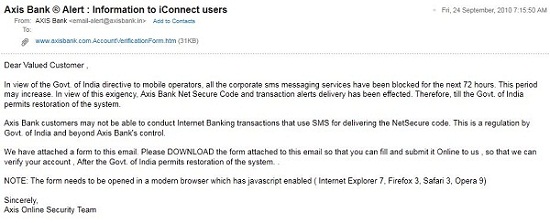
 

Phishing Email targetting Axisbank


I opened the HTML attachment, after a customary scan from AV. Now although this looks authentic, but is a bit suspicious because it is asking for too many private details that should evoke second thoughts from anybody. Generally any phishing attack would ask for username, password, cvv details at the max. But this one is prompting for ATM PIN,Transaction password, Secure Code/Verified by Visa, Email details. And unlike others where you enter the details on a site, it is sending an attachment to be filled and submitted. Modus Operandi is slightly different.

I bet someone who is familiar with Axis bank’s online transaction mechanism has set this up because Axis bank requires transaction password in addition to the details mentioned above for a online transaction. Now, the form is a html attachment and when you open everything looks authentic just take a look below.
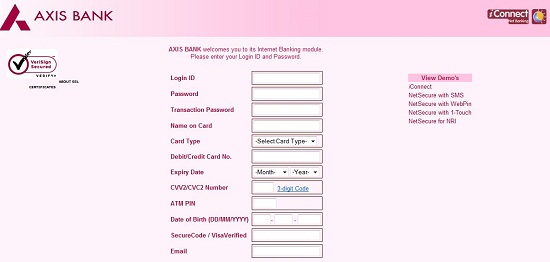


Phishing HTML attachment targetting Axis bank

This is it, but once you look at the page source carefully you will realize the bait. Using the POST method, all details would go to the URL specified instead of Axis bank:

 

Phishing URL targetting Axis bank


A Whois lookup for the domain above lists that is based out of Poland. All I can do is just notify Axis bank of this. It would have been better if the Government of India or the financial institutions have had made it clear if their services would continue to operate or be impeded due to this SMS ban.

Take care and please spread a word to ensure people do not fall for this

UPDATE:

I would have thought that the content in their email was written by a smart bloke, but it’s actually flicked from Axis Bank’s login page!

11 October

Received another Phishing email with the similar modus operandi , this time targeting ICICI Bank and hosted at:

 

Phishing email targeting ICICI customers


17th October

Another day, another Phishing email. The phishers are just not leaving any stone unturned as they target every bank with an online presence, this time targeting customers of HDFC Bank and hosted at:
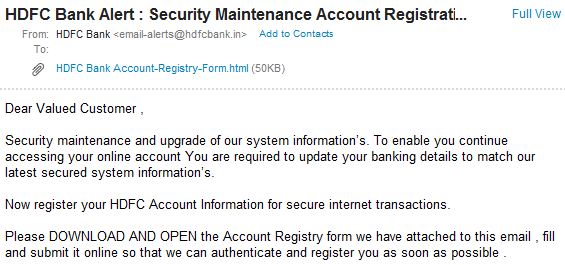


Phishing email targeting HDFC Bank customers

Here is the Phished URL:


Phishing email targeting HDFC Bank customers

Oh Wait..I think I just saw a similar email targeting Punjab National Banks’s customers land in my inbox!….
 

Operating System for Kids

Operating System for Kids

Operating System for Kids

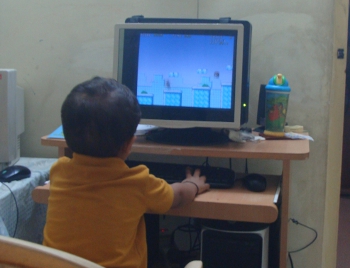
Ever since my two and half year old toddler started to play around with my laptop I was thinking about resurrecting my old desktop computer which I hadn’t used in ages. The next step was to look out for what is available in the market that qualifies to be called Kids Operating System so that apart from playing games, watching cartoons, learning is also incorporated in it. But at this point of time, my focus was on ease of use and availability of applications that are of interest to kids (games, rhymes, stories and etc)

Although hardware was not a worry for me, I came across some observations. Almost all of the Kids OS is developed using Open Source and there are hardly any commercial ones. Importantly for we parents the interesting part is that you need not tinker your existing operating system or hardware much and most of them are available for free. You could just leverage virtualization, yes. Just go and grab a free copy of VirtualBox
and you are ready to start a whole new computing experience for your kids.

Here are some choices for Operating System for Kids:

Edubuntu
http://edubuntu.org

Ubuntu (8.1 onwards) has an addon-module dedicated exclusively for kids and it is called Edubuntu. I found this fun to use and operate, and it has lot of applications like gCompris, periodic tables, arithmetic tutorials like fractions, drawing, touch typing, games like chess, connect4 etc. All the features that are available on the regular Ubuntu OS is also available in this, meaning Open Office, GIMP, Web-browser, email client etc.

Gcompris

However, since this is an Addon Module and not available as a separate OS, you will first need to install Ubuntu and then download this module as an ISO file and use the updater (Synaptics Package Manager) in Ubuntu to add it to the base OS. Unlike Ubuntu, you cannot get a free Edubuntu CD shipped…but that shouldn’t be a worry as download caps and speed are improving in India.

Edubuntu has also categorized different bundles, which contains applications suitable for a particular age group:

  • Preschool ( < 5 years old)
  • Primary ( ages 6-12)
  • Secondary ( ages 13-18)
  • Tertiary ( university level )


Qimo

http://qimo4kids.com

Kids Operating System


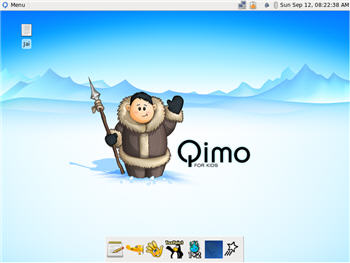
Based on Ubuntu Linux and Free to Download and install, it is also available as a Virtual box image and primarily targeted for Kids 3 years and above. Unlike Edubuntu, you need not install Ubuntu as a base. Qimo needs a minimum of 256MB of memory to run from the CD, or 192MB install. At least 6 GB of hard drive space is recommended, and a 400MHz or faster CPU.

Since both Qimo and Edubuntu are based on Ubuntu, they have many similar features. But installing and configuring Qimo is easier and has lesser steps compared to Edubuntu. Also, I found the Qimo OS much more attractive in terms of ease of use, layout, coloring and the feel of a typical Kids OS. Running Edubuntu on Ubuntu still gives you a feel of elders Operating system. But you could still customize the feel.

Kiddix
http://kiddix-computing.com

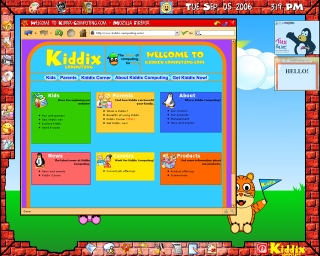
This too is based on Linux and Ubuntu in particular but this is a Commercial Operating System, meaning its a paid software. Their page however says that they are going to open the source code soon. You can download the Operating System setup files in the ISO format for as little as 10$. and install on your existing hardware. You can also purchase the hardware, ready with the OS for approximately about 300$.

Kiddix also comes with built-in Parental Control and mobile support.

I am yet to download and install this. So a review on this around the corner. Till then, take a look at their demo:

KidOS –
www.kidoscomputer.com


There is a new entrant on the block called KidOS which is based on Adobe AIR platform and requires Internet connection. The homepage says it still is in beta and currently I was able to run it on Windows 7, although it OS independent and only dependency is is Adobe AIR. Applications and modules can be downloaded for a price.

Kiddix Kids OS
Kiddix OS

As a parent you will first need to create an account providing your username and set a password and add child accounts. Looks like an innovative concept but requires an internet connection all the time to have some meaningful interactive experience. Moreover, you will need to pay and download content…

Any other Alternative?

I also found out that instead of allowing him to use the laptop directly I could provide him with a separate Keyboard (preferably USB) as the keys are delicate on the laptop and could come off easily. I faced this situation sometimes as my Kid would press the keys randomly sometimes and also pullout those keys as an expression of frustration. So he currently alternates between an old desktop with Windows OS and sometimes on my laptop when there is no electricity and he is desperate to play SuperTux game.

One advantage with Windows OS is that there are lot of games readily available and familiarity with Windows amongst family members may pose second thoughts on Linux. Apart from the familiarity part, Open Source based OS really score high in terms of package and future development. They would also inculcate the habit of sharing/giving back to the community.

Related: